Everything you log hangs off three things: a category, a move inside it, and a machine under that. You only really have to think about the first two — the third takes care of itself until you need it.
Categories, moves and machines
Category
A group of moves. Use body parts such as back and biceps, or your training days — Day 1, Day 2. It is only there to keep the move list tidy, so pick whatever matches how you think at the gym.
Move
The exercise itself — Bench Press, Pull-Up. This is what you pick when you log, and what your progress is measured for.
Machine
The particular bench, rack or device you did the move on. Every move gets one automatically, named "Default", so you can ignore machines completely until you need them.
When do I need more than one machine?
Only when the same exercise exists on two pieces of equipment whose numbers cannot be compared. Forty kilos on one gym's leg press is not forty kilos on another's, and comparing them would tell you that you got weaker overnight.
Add a machine for each one and each keeps its own record, so both stay honest. If that never happens to you, the single automatic machine is all you need.
Each machine is a folded section on the move's own page, holding that machine's name, its photo and its own workout history.
If the reason is that you train in two different places, set those up as gyms instead and the app will keep them apart for you. Training at more than one gym
Setting up a move
Everything about a move lives on one page: the settings below, the machines you do it on, their photos and their workout history. Open Moves and tap the move's name to get there.
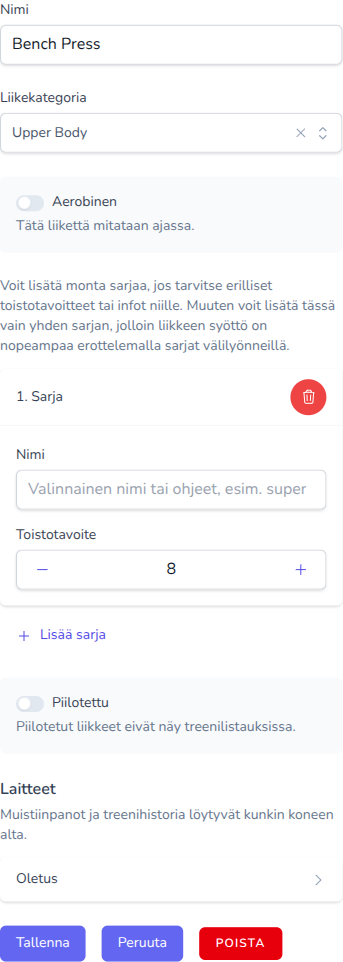
Open Moves, pick a category and add a move. Besides the name there are two switches:
- Aerobic — Workouts with this move will be measured in time.
- Hidden — Hidden moves are not shown in workout lists.
Turning on "Aerobic" reveals one more: "Less is better" — Faster time is better. Use for timed runs. Leave off for planks or holds where longer is better.
Series and the reps goal
Every move starts with one series and a reps goal of 8. For almost every move that is all you want: one input field, and you type all your sets into it separated by spaces.
You can add multiple series, if you need different minimum reps, or instructions per series. Otherwise you can just use one series here, and input multiple series by separating them with a space.
Each series can also carry a label, which simply shows above the field when you log — for example "Optional label or instructions, e.g. super-set".
Photos and tidying up
You can give a machine a photo — handy when the machine has no name, or when you want to remember which of the four identical benches it was. You can add it while logging, without leaving the page.
The same photo, and the machine's graph and workout history, are in the machine section of the move's page.
When you stop doing a move, hide it rather than deleting it. Hiding keeps it out of your way while your history stays intact; deleting a move removes its machines and all their workouts for good.